
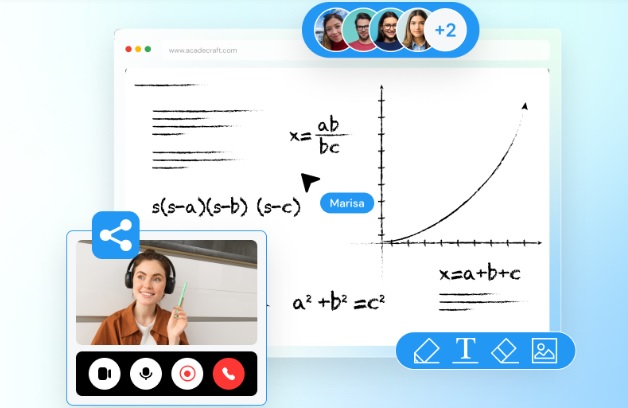
Interactive whiteboards are already speeding change in remote team collaboration and learning environments. With increasing adoption by workplaces and learning institutions of hybrid and remote models, such tools are called for more urgently than ever.
One recent study in the Canadian Journal of Learning and Technologies showed that about 48.2% of teachers reported having used interactive whiteboards either often or always. In contrast, only 12.6% of the respondents never reported using one, leading to a fairly high adoption rate by teachers. That shows the importance of interactive digital whiteboards as a learning solution tool.
Now, come to the corporate learning approaches. Professional interactive whiteboard learning offers significant enhancement in employee engagement and growth. It is because it provides dynamic and visually stimulating content as learning modules.
Collab: Interactive Whiteboard Learning and Remote Learners
Let’s discuss how interactive whiteboards are powering in connecting teams, real-time learning, and creating innovative learning experiences for those learners who are participating online or remotely. Go through the post below:
Real-Time Collaboration with Distributed Teams
The biggest challenge for distributed teams is the lack of shared physical space. Such a setting makes collaboration seem disconnected. Interactive whiteboards bridge this gap by facilitating real-time collaboration.
Interactive whiteboard learning solutions allow many users to access and contribute to the same board at any given time, regardless of where they are. It is very helpful during brainstorming sessions, project planning, and decision-making meetings. Digital sticky notes, mind maps, and flowcharts generate ideas in an organized format.
Easy Integration for Distant Learning Platforms
Whiteboards are designed to offer the easy integration of digital media for remote learning purposes by integrating video conferencing with document-sharing platforms. Several of the whiteboard products integrate directly with Zoom, Microsoft Teams, and so forth, allowing users to work on the whiteboard with others during a video conference. It is really simple to collaborate as a teaching or managing professional who’s part of a meeting. The professional interactive whiteboard learning is available on desktops, tablets, and mobile devices.
Increasing Engagement with Visual and Interactive Elements
Learning and collaboration sessions often lose the engagement that is often required in a virtual setting. Interactive whiteboards address this problem by providing engaging visual elements. Videos, images, GIFs, and diagrams may be added to make sessions more engaging and interactive and help learners in various ways to remember the content. The trainers or facilitators may use drag-and-drop activities, live polls, or quizzes that will enable the learners to practice concepts instantaneously and be active in the sessions.
Interactive whiteboard learning solutions foster a sense of community even in a distributed work setting. In other words, it is the shared virtual space where teams come together, which somehow defeats the idea of remote working.
Continuous Learning and Knowledge Sharing
Interactive whiteboards allow companies to create a culture of continuous learning as knowledge and skills can be easily shared.
Recorded Sessions for On-Demand Learning: Whiteboard interactive sessions can be recorded and saved, which enables the team members to revisit the sessions at their preferred time. This is particularly valuable in onboarding new employees or providing continuing training without disrupting workflows.
Shared Repositories of Knowledge: Teams can create a shared library of visual notes, flowcharts, and resources with interactive whiteboards-the living document. The repository would make new employees rapidly catch up, and existing team members would have a continuous source of updated knowledge.
Skill Development Exercises: Trainers can use the interactive whiteboards for skill development exercises ranging from technical skills development to soft skills such as communication and teamwork.
Scalability and Flexibility to Support the Growth of the Team
Professional interactive whiteboard learning solutions are very scalable, hence the tool can be there for organizations of any size. Adaptability according to team size: the whiteboard platforms can adapt well to all sizes of teams, be it a small team meeting or company wide training sessions, without the functionality and ease of using it compromised. Device-agnostic functionality means that employees can take part by being either in the office, at home, or even on the go. The whiteboards allow larger teams to personalize learning experiences. Users are enabled access to most relevant content for the role or level. This is essential in diverse organizations as employees may have varied learning needs.
Creating a Sense of Inclusivity and Connection
Whiteboards can be used as a tool that allows everyone to share the same ideas. That makes remote meetings and workshops more inclusive and collaborative because everyone gets a chance to add ideas, ask questions, or make suggestions.
Most interactive whiteboards have a breakout feature that allows the smaller groups to work together on specific tasks before regrouping. This is very important for training sessions that include hands-on exercises or group projects.
Final Thoughts
In this digital generation, remote teams can use computerized, interactive whiteboards to engage with each other while still learning in a synchronous setting. An interactive whiteboard allows teams to collaborate anywhere in the world, solving problems and innovating, using real-time collaboration, multimedia integration, innovative visualization tools, and inclusiveness. For this reason, interactive whiteboards become indispensable for companies living up to their spirits by working from home while pursuing continuous learning; they promote interaction engagement and reinforce the teamwork dynamics for organizational success. Interactive whiteboards are becoming indispensable for modern remote work-for daily check-ins, training, or brainstorming.
Related Posts

The Essentials Hoodie: A Must-Have for Modern Comfort and Style
In the world of fashion, there are few pieces that…

NMIMS Solved Assignments Dec 2024
With Solve Zone's custom answers for NMIMS Solved Assignments Dec…

The Complete Guide to Taxi Services in Kwinana
Taxi Kwinana, a vibrant suburb located south of Perth, is…